
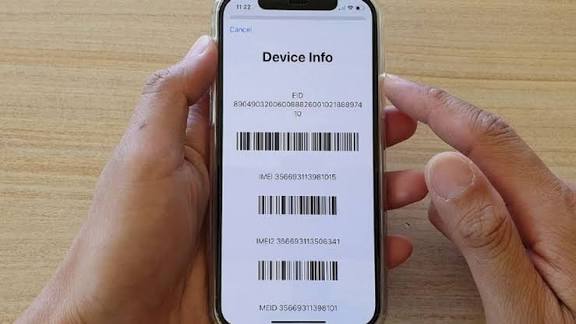
Losing your phone can be stressful, especially when it holds important personal data, messages, and memories. The good news is that you can track your lost phone using its IMEI number. IMEI stands for International Mobile Equipment Identity, and it is a unique 15-digit number assigned to every mobile device. Even if someone changes your SIM card, the IMEI number remains the same—making it useful for tracking.
In this guide, you’ll learn:
What an IMEI number is
How to find your phone’s IMEI
Whether you can track your phone using IMEI
Practical steps to recover your lost phone
What Is IMEI?
The IMEI number identifies your device on any mobile network. This means network providers and law enforcement agencies can use it to locate, block, or trace your lost phone if it gets stolen or used illegally.
How to Find Your IMEI Number
If your phone is lost but you didn’t note the IMEI number earlier, don’t worry—you can still retrieve it.
Method 1: Dial Code (Before Losing Phone)
Open your phone dialer and type:
*#06#
Your IMEI number will appear instantly.
Method 2: On Phone Settings
Android: Settings → About Phone → Status → IMEI
iPhone: Settings → General → About → IMEI
Method 3: On Phone Box or Receipt
If you still have the original box or purchase receipt, check the sticker label—it usually contains the IMEI.
Method 4: Google Account (Android)
Visit: https://www.google.com/settings
Log in → Scroll to Find your phone → Select device → View IMEI
Method 5: Apple ID (iPhone)
Go to appleid.apple.com → Sign in → Devices → Select your iPhone → View IMEI
Can You Track a Phone Directly With IMEI?
Direct IMEI tracking is not available to the public. Apps and websites that claim to track phones using IMEI are usually scams.
However, you can:
- Report the IMEI to your network provider
- Report it to the police
- Ask them to block or trace the device using their systems
- Use official tracking tools like Google Find My Device or Apple Find My iPhone
Steps to Track Your Lost Phone With IMEI
Follow these steps to improve your chances of recovery:
1. Report IMEI to Your Network Provider
Contact your SIM provider (MTN, Airtel, Glo, 9Mobile, etc.) and request:
IMEI registration
Device blocking
Assistance in tracking
2. File a Police Report
Visit your local police station with:
Your IMEI number
Proof of ownership (receipt, box, email)
Law enforcement can request tracking from network providers.
3. Use Online Tracking Tools
While IMEI helps with official tracking, use these tools immediately:
Brand Tool Link
Android Find My Device google.com/android/find
iPhone Find My iPhone icloud.com/find
Samsung Find My Mobile findmymobile.samsung.com
Xiaomi Mi Cloud i.mi.com
Stay Safe: Avoid Fake IMEI Trackers
Many websites claim they can track phones using IMEI. Avoid them — they are often scams designed to steal your data.
Pro Tips to Protect Your Phone
Enable Find My Device on Android/iPhone
Always use screen lock and SIM lock
Turn on Google/Apple account sync
Write down your IMEI number and store it safely
Tracking your lost phone using the IMEI number is possible but requires help from network providers and authorities. For faster results, combine IMEI reporting with Google Find My Device or Apple Find My iPhone.
Don’t wait until it’s too late, find your IMEI number today and keep it safe.